
Sign in with your Apple Account, add your show by RSS feed and send it for review. For hosts and producers setting up a new show or taking over an existing one.
Last updated October 2026
About 15 minutes
Quick answer
To set up Apple Podcasts Connect, sign in at podcastsconnect.apple.com with an Apple Account that has two-factor authentication, name your account, and agree to the terms. Then click Add (+), choose New Show, and add your show with the RSS feed from your podcast host. Apple validates and reviews the show before it appears on Apple Podcasts.
Before you start
Step by step
1
Check that two-factor authentication is on, a payment method is added, and the Apple Media Services terms are accepted. Every person on your team should use their own Apple Account. Never share a login, because the two-factor codes go to the owner's devices.
Tip: If Apple asks you to complete activation when you sign in, add a payment method and try again.
2
Go to podcastsconnect.apple.com and sign in with your Apple Account. Give the account a name, then choose an account type: Individual (you, or a sole proprietor) or Company (a registered company or organization, one shared account you add users to). Agree to the Terms of Service.
3
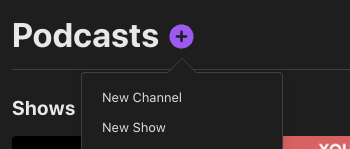
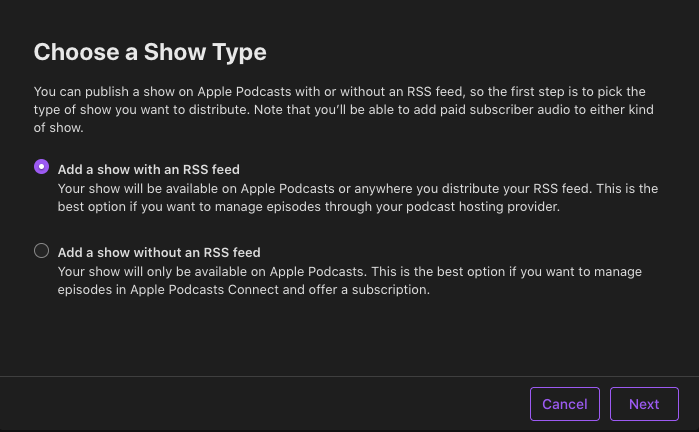
Click Add (+) and choose New Show. Select Add a show with an RSS feed and paste the feed URL from your podcast host. Decide whether to restrict which users in your account can see this show, then click Add.
Tip: Already on Apple Podcasts? Don't add it again. Claim it instead (step 7).
4
Review the Show Information page. Details in your RSS feed override anything you type in Podcasts Connect, so fix titles, descriptions and artwork at your host.
Set Content Rights to confirm you have the rights to any third-party content, then add contact information so Apple can reach you about any issues.
5
Under Availability, set Countries or Regions, Distribution, Transcripts (your own through RSS, or Apple-generated), Show Release (now or on a scheduled date) and Show Claiming.
Tip: Show Claiming can block anyone from generating a claim token for your show. Leave claiming open if you might move the show to another account later.
6
Click Save, then publish the show. Apple validates your feed first, and any warnings must be fixed before you can publish. After that, the show goes through Apple's review before it appears on Apple Podcasts.
Apple doesn't promise a set review time, so check back in Podcasts Connect. Passing validation doesn't guarantee approval: the content must also follow Apple's guidelines.
7
If your show is listed on Apple Podcasts but isn't in your account, go to the bottom of the page and, under More Actions, click Claim Existing Show. Follow the prompts to find your show and generate a claim token.
Log in to your podcast host and paste the token into its claim field. Apple checks the token in your RSS feed and moves the show to your account within 24 hours. The token expires seven days after you create it.

Tip: Your host must support claiming. Shows in a channel, shows with a subscription and shows with Apple-hosted audio can't be claimed.
8
Invite your producer, editor or agency as users with their own Apple Account instead of sharing your login. Only an Admin can add people, and you choose their role and which shows they can see.
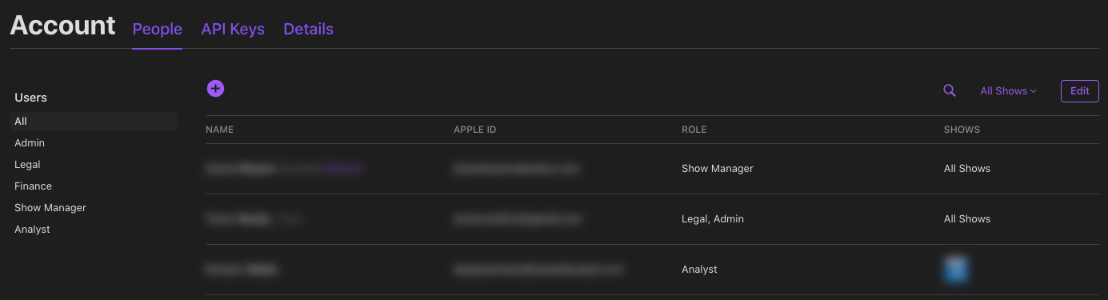
Tip: Follow our separate guide for the full steps and which role to choose.
How to Add a Team Member to Your PodcastTroubleshooting
Managed Apple Accounts don't work. If Apple asks you to complete activation, add a payment method to your Apple Account. If the terms aren't accepted yet, sign in at podcasts.apple.com and follow the prompts.
Common causes: no episodes in the feed, missing tags (category, description, language, explicit or title), an unescaped "&" in a category, or files Apple can't reach. Fix it at your host, then try again.
Your RSS feed overrides what you type in Podcasts Connect. Change the title, description or artwork at your podcast host instead.
Use a square JPG or PNG between 1400 x 1400 and 3000 x 3000 pixels, with no transparency. Apple prefers the largest size.
Don't add it again. Claim it with More Actions → Claim Existing Show. If claiming is blocked, the current account can change Show Claiming under Availability, or you can contact Apple Podcasts support.
Tokens expire seven days after you create them, and your host must support claiming. Generate a fresh token right before you paste it at your host.
Questions
Is Apple Podcasts Connect free?
Yes, you can submit a free show to Apple Podcasts Connect by RSS feed without paying Apple. You need a payment method on your Apple Account, but you aren't charged unless you buy something. Paid subscriptions through the Apple Podcasters Program have an annual fee.
Do I need an Apple Account to use Apple Podcasts Connect?
Yes. Apple Podcasts Connect needs an Apple Account with two-factor authentication turned on. Managed Apple Accounts can't be used, and the account needs a valid payment method and the Apple Media Services terms accepted.
How long does Apple Podcasts review take?
Apple doesn't publish a set review time for new shows in Apple Podcasts Connect. Your feed is validated first, then reviewed. Check your show in Podcasts Connect and fix any warnings it shows.
How do I move a show that's already on Apple Podcasts into my account?
Claim it in Apple Podcasts Connect with More Actions → Claim Existing Show. Paste the claim token at your podcast host. Apple checks your feed and moves the show within 24 hours. The token expires after seven days.
Should I give my producer my Apple login?
No. In Apple Podcasts Connect, invite your producer as a user with their own Apple Account. Two-factor codes go to the owner's devices, so shared logins cause problems. An Admin adds users and picks their role and show access.
Official help
These are the official help pages for each step. Platforms update their menus often, so check here if a button has moved.
Not affiliated with Apple. Steps checked in October 2026; menus may change.
Next step
Your show is set up. Now invite your producer, editor or agency with their own Apple Account, so nobody has to share a login.
Podcast Impact Studio helps purpose-driven hosts launch and grow their shows.